Chat in TrainerPlan: Talk to Your Athletes and Coaches Where the Training Is
Training conversations scattered across WhatsApp, email and DMs have a way of getting lost — and they live nowhere near the workouts they’re about. TrainerPlan’s built-in chat keeps coach–athlete communication inside the platform, right next to the calendar, the plan and the data.
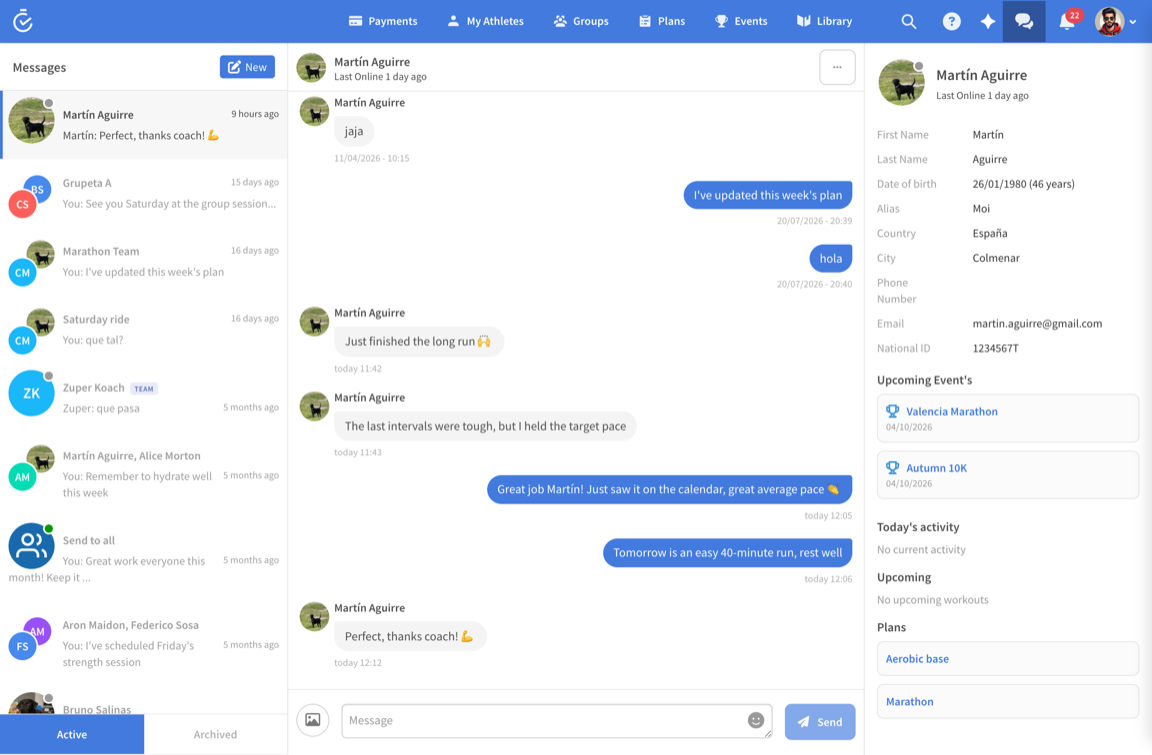
The Messages page
Open Messages from the top bar to get the full-screen view: every conversation on the left, the open thread in the middle, and the athlete’s context on the right.
- All your conversations in one list — individual athletes and group conversations for your teams, ordered by most recent, with the last message previewed so you can triage at a glance.
- Context while you type: the right-hand panel shows who you’re talking to — their upcoming events, today’s activity and the plans assigned to them. No tab-switching mid-conversation.
- Attachments: send images and files directly in the thread — a route map, a gym video, a race bib confirmation.
- Send to all: one message to everyone you coach, for race-week logistics or a session change.
- Active and Archived: keep the list clean by archiving conversations you don’t need every day, without losing the history.
The chat widget: keep conversations open while you work
You rarely message someone instead of working — you message them while planning their week. That’s what the chat widget is for.
- Open the chat widget from anywhere in TrainerPlan and pick a conversation from its dropdown.
- Keep several conversations open at the same time — reply to one athlete while another thread stays open beside it, exactly like the messaging apps you already use.
- Your chats follow you across pages. Move from the calendar to an athlete’s profile to your plans and the open conversations stay put — no reopening, no losing your place mid-sentence.
- Unread messages reach you anywhere: the badge appears on the chat icon and even in the browser tab’s favicon, so you notice a new message while working in another tab.
- For coaches with a team, conversations show a team badge so you always know which hat you’re wearing.
The practical effect: you can build next week’s plan and answer three athletes without ever leaving the calendar.
For athletes
- Message your coach from the web, or from the Chats tab in the mobile app.
- Work with more than one coach, or with a coaching team? Each one gets its own separate conversation.
- In the mobile app, the My Trainer page puts your coach’s profile and a direct chat button one tap away.
Never miss a message
New messages are notified in the app, by email and by push notification on your phone, following your notification settings — so a question the night before a key session doesn’t go unanswered.
Why in-app beats a messaging app
- The conversation sits next to the training it’s about — “look at Tuesday’s intervals” is one click away, for both of you.
- Your coaching history stays with the athlete’s account instead of disappearing up a personal chat log.
- Athletes reach you in your professional space, not on your personal phone number.