Using the TrainerPlan AI Assistant
The TrainerPlan AI assistant is a chat helper, available inside your dashboard, that knows your training context and can answer questions about your plans, workouts, and athletes. This article explains what it can do, what it can’t, and how your data is handled.
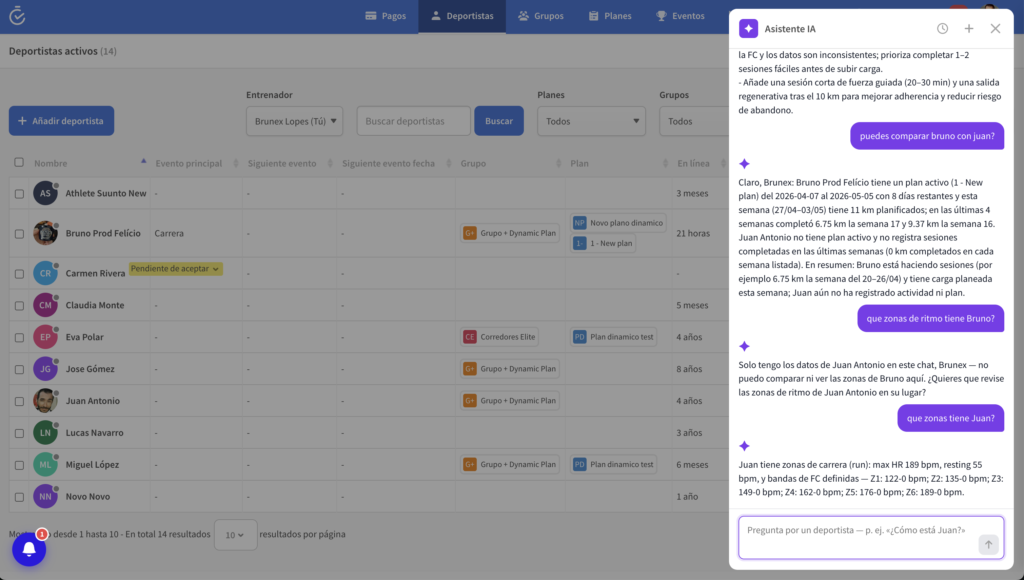
What it can do
- Summarise a workout, week, or training block in plain language.
- Answer questions about a specific athlete’s recent training (intensity, volume, trends).
- Suggest adjustments to an existing workout based on the athlete’s profile and goals.
- Explain training concepts (zones, intervals, periodisation) using language the athlete will understand.
- Help you draft notes or messages to athletes.
How to ask good questions
The assistant works best when you give it a specific scope. A few examples that tend to produce useful answers:
- “Summarise Maria’s last 4 weeks. Did intensity trend up or down?”
- “This Tuesday’s session is 6×800m. The athlete is sore. What’s a sensible adjustment?”
- “Explain Zone 4 work to a beginner athlete in two sentences.”
Open-ended questions like “is this plan good?” tend to get vaguer answers. Anchor the question to a specific athlete, week, or workout when you can.
What data the assistant sees
To give answers grounded in your training context, the assistant sends the following to OpenAI (our AI provider) with each request:
- The chat messages you submit.
- Relevant training history, workout structure, and performance metrics for the athlete or workout you ask about.
- Profile attributes you have provided (age, sport, goals, experience level).
It does not send account passwords, payment data, or contact details. Outputs and chat history are stored in your TrainerPlan account so you can revisit them later — you can delete them at any time.
Privacy and opt-out
OpenAI processes API data on TrainerPlan’s behalf and does not use it to train its models. You can disable AI features for your account in your settings, or by writing to info@trainerplan.co. For the full details, see our Privacy Policy.
Limitations to keep in mind
- The assistant produces suggestions, not prescriptions. Review every output before applying it to an athlete.
- It does not provide medical advice. For health questions, refer the athlete to a qualified healthcare professional.
- It can occasionally be confidently wrong. If something doesn’t match what you know about the athlete, trust your judgement over the assistant.
- Long, vague conversations drift. If an answer is going off-track, start a fresh chat with a focused prompt.
Where to find it
Open any athlete or workout in your dashboard and click the AI Assistant icon (the chat bubble in the top right). The assistant will pick up the context from the page you’re on.
Feedback
The assistant is improving as we collect feedback. If you spot a poor answer, an inaccurate summary, or have an idea for a feature, write to us at info@trainerplan.co.