How to generate AI workouts in TrainerPlan
The AI workout generator lets you create a complete workout from a free-text description. Describe what you want and TrainerPlan’s AI generates the warm-up, main set, and cool-down — saving you time and giving you a solid starting structure.
Where to find it
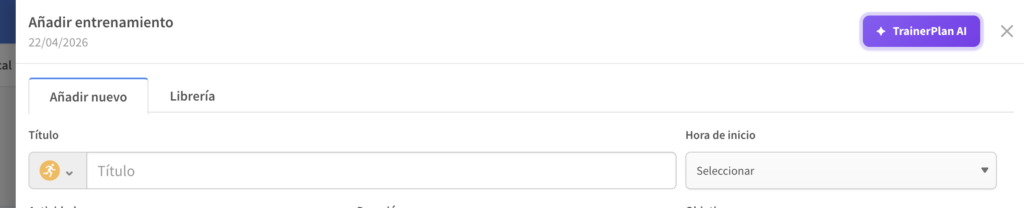
Open any workout in the web app (app.trainerplan.co). In the workout modal header, click the ✦ TrainerPlan AI button (top right). A text field will appear where you can describe the session.
How to use it
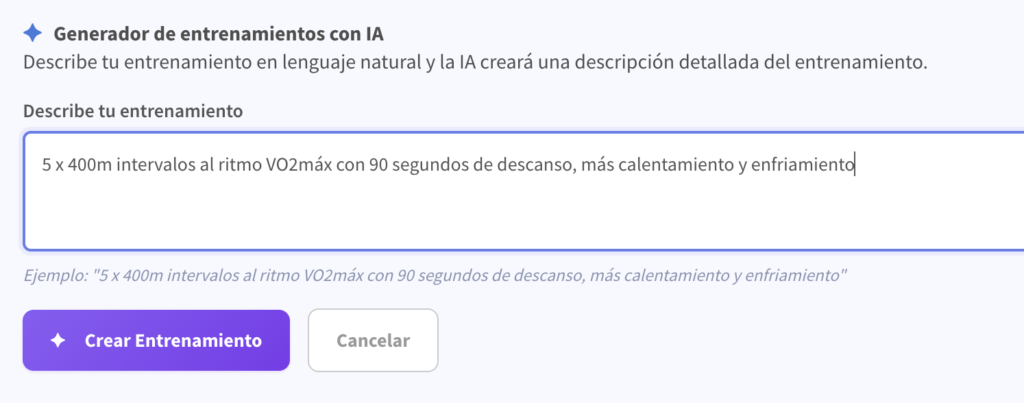
- Write a natural-language description of the workout.
Example: “45-minute tempo run with a 10-minute warm-up and 5-minute cool-down”. - Click Generate workout.
- Review the generated structure (warm-up, intervals, recovery, cool-down).
- Adjust any step if needed and save the workout as usual.
Tips for better results
- State the total duration or distance.
- Specify the session type: easy run, intervals, tempo, long run, hills, etc.
- Include pace, heart-rate or power targets if you want them applied (“in HR zone 2”, “at marathon pace”).
- Be specific but brief — one or two sentences are usually enough.
Who can use it?
The AI workout generator is available on the following plans:
- Starter — 300 generations per month
- Basic — 1,000 generations per month
- Elite — 3,000 generations per month
Athletes with an active premium subscription get 100 generations per month.
Users on legacy plans don’t have access; upgrade from Profile → Plans to unlock it.
Important
- The feature is in Beta: we’ll keep improving prompts and accuracy over time.
- Generated workouts can be freely edited after creation. AI is a starting point, not a substitute for your judgement as a coach.
📩 Questions or feedback?
Email us at info@trainerplan.co