Manage your customers’ payments
You can configure your customers’ payments to keep you informed about your business more easily. All to theInterior of Plan Dtraining.
Set up a regular payment
Select LOne of your customers in the list and above this athlete’s navigation, select Payments.

Click onSet PaymentSet a new payment settings window swill open.

Here you can add a title, value, start date, and frequency (weekly or monthly).
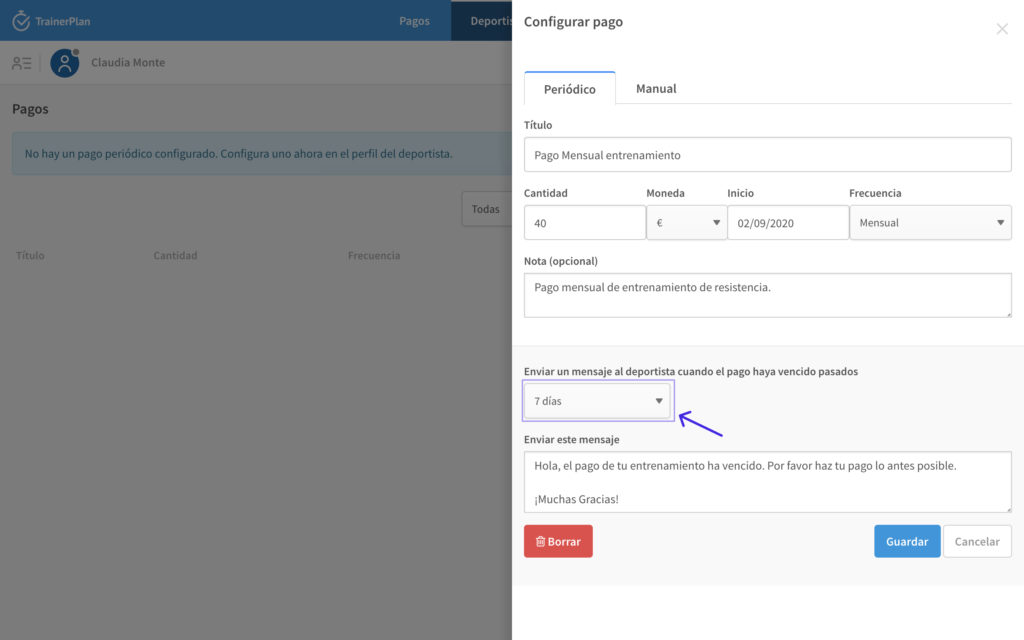
If you wish, you can also add a reminder for theSend to your customer to remind you of payment. Once the date you have chosen, a message will be sent to your customer with the message of your choice.
When confirming payment, you can mark it as paid.


So, in the main navigation, you have thePayments tabWhere you have all your payments in one place so that your business is in one goeye with ease.

Configure a manual payment
You can also add manual payments when you have sporadic payments that are not always periodic.
